 CCS Plus Consulting Team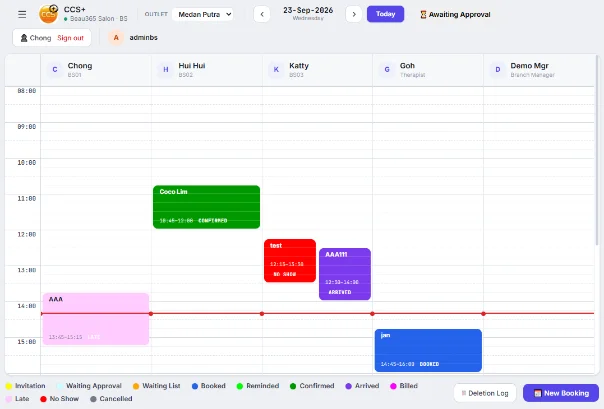
Most of a salon's costs are fixed: rent, staff and utilities keep running whether customers show up or not. So an empty bed isn't "money you didn't make". It's money you're losing.
Filling your beds works faster than running one more ad. Here are three things you can start doing right away.
1. See each day's schedule clearly
Lay the day out by staff and by bed: who has a customer at what time, and which time slots sit empty. Many salon owners do this for one week and discover that 2 pm to 4 pm is empty almost every day. Once you know where the gaps are, you know what to fill.
2. Send automatic reminders to cut no-shows
When a customer forgets her appointment, the bed sits empty again. Send a reminder as soon as the booking is made, and another one the day before. Customers see you as professional, and those who need to cancel tell you earlier, so you still have time to fill the slot.
3. Reverse Booking: let staff invite customers back
The old way is to wait for customers to call. Reverse Booking flips it: the system finds customers with unused package sessions, or who are due to come back, and gives them to staff to invite during quiet hours. Empty slots turn into bookings from returning customers.
Booking isn't only recording when customers come. It's also deciding when they come.
Summary
- Spend one week finding the time slots that are always empty
- Every booking gets an automatic reminder
- Give the empty slots to staff to invite customers with unused package sessions
Want to see how the CCS Plus booking calendar and Reverse Booking work? A 30-minute Demo will show you.